BUENA VISTA STUDIO · SAN ANTONIO
Photography Studio Rental FAQs
Everything you need to know before renting our natural-light photography studio in San Antonio,
01 — GETTING HERE & STUDIO ACCESS
WELCOME TO WAREHOUSE 5
Your studio day starts here.
-
Buena Vista Studio is located on the second floor of Warehouse 5 in downtown San Antonio. Detailed parking, access, and entry instructions are provided prior to your session.
As a little bonus, Mural Roasters is located on the first floor of the building. Let them know you’re a client at Buena Vista Studio Suite 205 to get a discount on your order.
-
Free parking is available directly across the street from the building and along surrounding street parking areas near Warehouse 5.
A detailed parking map and arrival instructions will be included in your Studio Guide sent prior to your session for the easiest arrival experience.
Please do not park beyond the black gates located behind the building, as those areas are reserved and not part of Buena Vista Studio parking.
-
Unfortunately, no. Our building is nearly 100 years old and does not have elevator access. Buena Vista Studio is located on the second floor, so while there is a staircase involved, it’s a fairly quick walk up to the studio.
-
Our standard studio hours are 8 AM to 8 PM. After-hours sessions may be accommodated upon request and approval.
-
You will receive confirmation emails and reminder emails leading up to your session. Your studio access code and final arrival details will be texted to you the day before your booking, along with our helpful Studio Guide containing parking and building access information.
-
Absolutely. We’d be happy to coordinate a quick walkthrough of the space when available. Send us a message to schedule a tour.
02 — EQUIPMENT & AMENITIES
STUDIO SUPPORT EQUIPMENT
TOOLS TO SUPPORT
YOUR VISION.
Your studio rental includes support equipment and light modifiers, including C-stands, pipe-and-drape stands, reflectors, and softboxes. Artificial lights and strobes are not provided, so please bring any light sources required for your session.
-
Your rental includes access to a variety of studio essentials, props, and creative tools designed to make your session smooth, comfortable, and versatile. Amenities include:
• Large industrial-style natural light windows
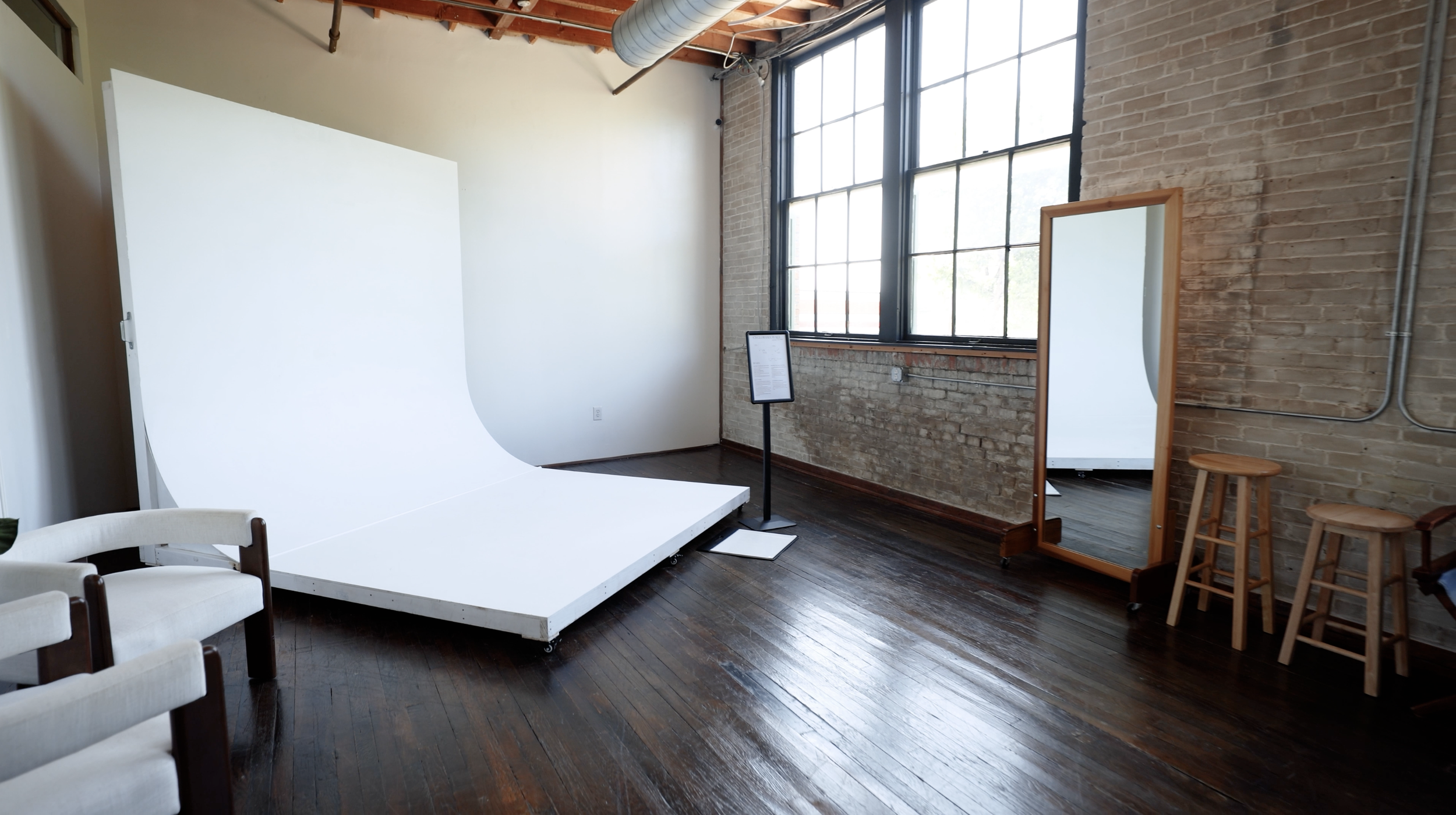
• Movable cyclorama (cyc) wall with detachable stage
• Moving mirror and stationary mirror
• Large movable olive tree
• Matching accent chairs
• Wooden ladder prop
• Various cylinder podiums and risers
• Curated furniture and movable props
• Brick accent wall
• Decorative framed wall detailing for added texture and dimension
• C-stands and light stands
• Movable seamless paper backdrop system
• Multiple backdrop paper colors and fabrics
• Tape, scissors, and basic styling tools
• Extension cords and charging cables (USB-C and Lightning)
• Lens wipes
• Bluetooth speaker
• Complimentary cold watersWe’re always continuing to add thoughtful touches, props, and creative tools to elevate the studio experience for our guests.
-
We offer softboxes, light stands, C-stands, reflectors, and a spotlight for use during your session. At this time, we do not provide strobes or advanced studio lighting equipment.
Buena Vista Studio was designed to be a natural light photography studio, and we pride ourselves on the soft, consistent light throughout the space.
-
Absolutely. You’re welcome to bring your own lighting, props, backdrops, and production equipment into the space.
-
Yes. We offer a selection of 107’ and 53’ seamless paper backdrops available for use during your session. Availability and colors may vary.
-
Yes. Buena Vista Studio offers select seasonal and themed sets throughout the year. All available sets are included with your studio reservation at no additional cost. Set availability and dates will be announced on our website and social media.
-
Yes. Most studio furniture and props may be repositioned during your reservation. Please lift furniture instead of dragging it and return every item to its original location before leaving.
-
We do not have a dedicated changing room inside the studio. However, the restrooms are conveniently located right next to the studio and are commonly used for outfit changes during sessions.
-
Yes. Complimentary cold water is available for you and your guests during your reservation.
-
Yes. A Bluetooth speaker is available for use during your session. Please keep the volume at a respectful level for the other businesses and guests inside Warehouse Five.
-
The studio includes select USB-C and Lightning charging cords, extension cords, tape, scissors, lens wipes, and other small studio essentials. Availability may vary, so please bring any specialty supplies required for your session.
03 — GETTING HERE & STUDIO ACCESS
THE SPACE
ROOM TO CREATE. LIGHT TO MAKE YOURS.
Learn more about the studio’s capacity, natural light, creative environment, and what to expect during your reservation.
-
Buena Vista Studio comfortably accommodates up to six people at a time. While we are an intimate space, the movable setups, furniture, props, and equipment allow the studio to adapt to a variety of creative needs.
Larger productions may be considered depending on the type of session. Please contact the Studio before booking so we can help determine whether the space is the right fit.
-
The studio’s north-facing windows provide soft, consistent natural light throughout the day. Late morning through the afternoon is typically the brightest, but the appearance and intensity of the light may change depending on the weather and season.
For a darker or fully controlled setup, we recommend booking an evening or after-hours reservation and bringing your own light sources and light-control equipment.
-
No. The studio does not have blackout curtains for the windows. Our ceiling-mounted curtains are decorative and can be used as creative backdrops, but they are not designed to completely block the studio’s natural light.
For a darker setup, we recommend booking an evening or after-hours reservation and bringing any additional light-control equipment you may need.
-
Yes. Buena Vista Studio is pet friendly. Pets must remain supervised and under control throughout the reservation.
Please clean up after your pet and keep them away from seamless paper, curtains, furniture, and equipment unless they are actively being photographed. Renters are responsible for any cleaning or damage caused by their pets.
04 — RESERVATIONS & MEMBERSHIPS
BEFORE YOU BOOK
PLAN YOUR SESSION. CREATE HERE MORE OFTEN.
Important details about reservation timing, resetting the studio, and rescheduling.
-
All setup, shooting, and cleanup must be completed within your reserved time. Please reserve enough time to prepare the studio, complete your session, and return everything to its original location.
You’ll receive access to the studio 10 minutes before your reservation to enter the space and get settled. This early access does not extend your reserved shooting or setup time.
-
Before leaving the studio:
• Return furniture, props, and equipment to their original locations.
• Roll up any seamless paper that was used.
• Return the curtains to their original position near the studio door.
• Return the mobile backdrop system and cyclorama to their original positions and lock every caster.
• Remove all personal belongings, decorations, and outside equipment.
• Dispose of trash and leave the space ready for the next renter.
• Make sure the studio door closes securely when you leave.All resetting and cleanup must be completed before your reservation ends.
-
Reservations may be rescheduled when the request is submitted more than 24 hours before the scheduled start time. All changes are subject to studio availability.
Reservations cannot be rescheduled within 24 hours of the scheduled start time. Please contact the Studio as soon as possible if you need assistance with an upcoming reservation.
-
Yes. Buena Vista Studio offers a limited number of studio memberships for creatives who need consistent access to the space.
Membership benefits include monthly studio hours, 24/7 access with a reservation, priority booking, a personalized studio access code, workshop discounts, and additional community benefits.
Interested in becoming a member? Send us a message to learn more about current membership availability.
05 — EQUIPMENT HOW TO GUIDES
USE THE STUDIO WITH CONFIDENCE
SIGNATURE FEATURES.
SIMPLE GUIDES.
Explore Buena Vista Studio’s signature features and learn how to safely prepare, use, and reset each setup during your reservation. Click on the following HOW-TO GUIDES to learn how to use:
HOW TO USE THE MOBILE BACKDROP SYSTEM.
Our mobile seamless paper backdrop system can be repositioned throughout the studio. Please follow these steps carefully to protect yourself, equipment, and rolls.
-
Move the backdrop system into position by holding the metal frame. Lock all caster wheels before operating the crank, release lever, or paper pulleys.
-
Keep a firm grip on the crank handle at all times. Turn the crank slowly to raise the backdrop system to your desired height.
-
Select your backdrop and use its corresponding pulley chain to slowly lower the paper. Lower only the amount needed for your setup.
-
Use the same pulley chain to carefully roll the paper back up. Make sure the paper rolls evenly and does not bunch, wrinkle, or pull to one side.
-
Before lowering the frame, fully raise all backdrop paper. Confirm that the caster wheels remain locked and maintain a firm grip on the crank handle.
-
With a firm grip on the crank handle, make a half-crank turn and hold the release lever. Slowly guide the system down using the crank. Keep control of the handle until the system is completely lowered.
IMPORTANT: Maintain a firm grip on the crank handle whenever the release lever is engaged. Never release the handle or allow the system to lower freely. If you need assistance, stop and contact the Studio.
HOW TO ACCESS AND USE THE STUDIO CURTAINS
Our ceiling-mounted curtains can be pulled across the studio to create soft, layered backdrops. Gather all curtains near the door then move the mobile backdrop system closer to the closet to create enough space for the curtains to hang in front. This creates the safest and clearest path for repositioning the equipment.
-
Begin by gently moving all curtain panels together toward the studio door. Gathering every panel in this area creates the necessary space to reposition the mobile backdrop system safely.
-
Remove furniture, props, cords, and equipment from the path between the backdrop system and the closet. Make sure no curtain fabric is underneath or wrapped around the system’s wheels.
-
Unlock each caster wheel on the mobile backdrop system. Move the system by holding the solid metal frame. Never move it by pulling on the paper rolls, chains, or crossbars.
-
Slowly roll the backdrop system back toward the closet. Position it as close to the closet as directed in the video, leaving enough clearance for the frame, wheels, and surrounding furniture.
-
Once the backdrop system is positioned near the closet, lock every caster wheel. Confirm that the system is stable before moving the curtains.
-
Choose your preferred curtain color or combination. Gently guide the panels away from the door and across the overhead track so they hang in front of the mobile backdrop system.
-
Spread, layer, or gather the curtains to create your desired look. Do not remove the curtains from their hooks or pull down on the overhead track.
-
When your session ends, gently return all curtain panels toward the studio door. Move the mobile backdrop system back to its original position, lock every caster wheel, and leave the area ready for the next renter.
HOW TO USE THE MOVABLE CYCLORAMA AND DETACHABLE STAGE
Our cyclorama includes a movable curved wall and an optional detachable stage. You may reposition the complete setup with the stage attached or separate the two pieces to create different layouts, lighting angles, and compositions.
-
Move furniture, props, cords, and equipment away from the cyclorama. Make sure there is enough space to safely reposition the wall and stage.
-
Before moving the cyclorama, confirm that the stage is properly aligned and securely connected to the curved wall.
Detaching the stage is optional. If you prefer to use or move the pieces separately, release the connection and place the stage in a clear, level area.
-
Unlock every caster on the cyclorama wall before moving it. Never push or pull the setup while any caster is still locked.
-
Slowly reposition the cyclorama by holding its solid sides or frame. Do not push, pull, or place pressure on the curved shooting surface.
If the stage remains attached, move the complete setup slowly and watch the stage edges, wheels, surrounding furniture, and studio walls.
-
Once the cyclorama is in position, lock every caster. Confirm that the setup is stable before anyone steps onto the stage or begins shooting.
-
If you detached the stage, carefully realign it with the curved wall and secure the connecting seam before use.
-
Use the provided sticky mat before stepping onto the cyclorama. Do not drag furniture, stands, props, or equipment across the wall or stage.
-
When your session ends, unlock every caster and return the cyclorama to its original position. Lock every caster again and reconnect the stage if it was removed.